Privacy8 min read
Expiring Photos on Grindr: How to Send Them, and What They Don't Protect
By Golo Team
To send an expiring photo on Grindr, open the chat, tap the camera icon, choose the photo, tap the timer (stopwatch) button and then Send Expiring. The other man can open it once, for up to 10 seconds. Grindr blocks screenshots of it, but Grindr itself warns that people can still keep a copy in other ways, and no app can stop someone pointing a second phone at the screen. So before you send, know what the timer covers and what it doesn't.
How to send an expiring photo on Grindr
- Open the chat with the man you want to send it to.
- Tap the camera icon below the typing bar.
- Choose the photo. If it isn't in your Grindr media yet, tap the (+) icon, pick a photo from your phone or take a new one, then tap Next/Save.
- Tap the timer. Grindr's help page describes it as a countdown button that looks like a stopwatch or watch.
- Tap Send Expiring.
If you tap Send instead of the timer, the photo goes as a regular chat photo, with no timer. To open an expiring photo someone sent you, tap it in your messages. You can open it only once, so open it when you have a moment to look.
Free accounts get one expiring photo a day
Grindr's help page sets a daily limit by plan:
| Grindr plan | Expiring photos you can send |
|---|---|
| Free | 1 a day |
| XTRA | 5 a day |
| Unlimited | No limit |
The same page also calls expiring photos a feature for "premium users only", so its heading and its text don't agree. If you're on a free account and don't see the timer, that may be why.
Two more limits are easy to miss. Free accounts can send only one photo at a time, while paid accounts can send several at once. And you need the Grindr app to view expiring photos: Grindr Web, the version that runs in a web browser, can't open them.
Does Grindr notify screenshots? Its help pages describe blocking, not alerts
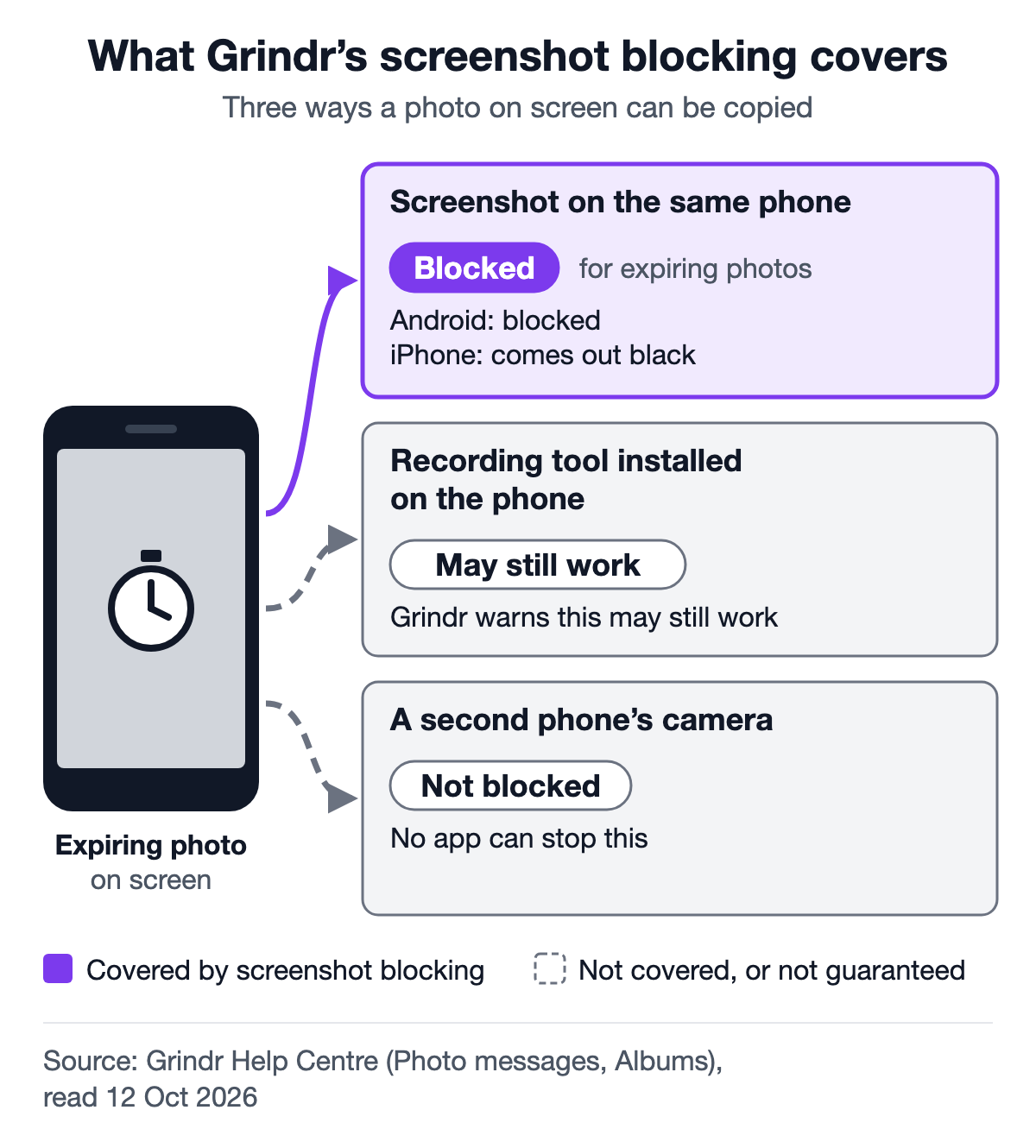
Grindr's help pages don't describe any screenshot notification to the sender. What they do describe is blocking: Grindr says that since 5 January 2026 its app stops screenshots of photos sent in chat. On Android, the screenshot can't be taken at all. On iPhone, the screenshot comes out as a black image.
We searched Grindr's Help Centre for "screenshot" and "screenshot notification" on 12 October 2026. The results cover screenshot blocking, warnings about other ways to capture photos, and pages asking you to send support a screenshot of a problem. None of the pages we read describes an alert.
Grindr's screenshot blocking is not only for chat photos. Its safety tips page says it also covers content such as expiring photos, albums and profiles. None of the pages we read says that screenshots of written messages are blocked, and Grindr's "Establishing trust" page warns that people may save or share "messages or photos" you send in chat.
What expiring photos don't stop
An expiring photo stops a second look and an ordinary screenshot on the same phone. It doesn't stop someone keeping a copy in other ways, and Grindr says so on several of its own help pages:
- A second phone's camera. Grindr's albums page warns that someone may use "an additional device to take a photo of a device displaying private content". No app can block the camera on another phone.
- Recording tools. That warning goes on to name "third-party recording tools installed on their device".
- Other tricks. Grindr's photo messages page, the one that explains screenshot blocking, says "bad actors can still use various techniques to capture images".
- No guarantee. Grindr's safety tips say screenshot blocking "can help reduce misuse", but "no method is foolproof".
Australia's eSafety Commissioner, the Australian Government's online-safety regulator, makes the same point in its guide to Grindr: "there still may be ways for someone to keep a copy".
Anything you send, photos included, "can potentially be shared beyond your control", Grindr's safety tips warn. They also describe sextortion: someone records intimate chats or videos, then threatens to share them unless their demands are met.
Before you send
This is our advice, built on the warnings above:
- Decide as if the photo could be kept. The timer limits how long he can look. It does not stop a copy.
- Leave out anything that could identify you: your face, a tattoo, your room, a letter or ID card, a window that shows your street. Grindr itself advises against putting your phone number, home address, workplace or last name on your public profile. A photo's background can give away the same things. And don't send a photo that is also on your social media: Grindr warns that such a photo makes it "easy for someone to do a reverse image search" and find that account.
- Say no if someone pushes you to send. You don't owe anyone a photo. If he keeps asking after you've said no, you can stop replying.
Regular chat photos and expiring albums follow different rules
Grindr's own pages don't agree on whether regular chat photos can be screenshotted. Its photo messages page says screenshots of chat photos are blocked since January 2026. Its "Taken on Grindr" page, about photos taken with Grindr's in-app camera, still says photos sent via chat "can be captured via screenshot". Until the pages agree, assume a regular chat photo can be saved.
Expiring albums are for XTRA and Unlimited subscribers. An album is a group of photos you share with someone. With an expiring album, you choose how long he can see it: view once, 10 minutes, 1 hour or 24 hours.
- The timer starts when you share the album, not when he first opens it, so the time runs even if he hasn't looked yet.
- You can stop sharing an album at any time. He loses access straight away and isn't told.
- Albums open on Grindr Web on a computer (not in a phone's browser), unlike expiring photos. Grindr asks users to keep album screenshot safety in mind there too.
| If you want to share… | Use |
|---|---|
| One photo, seen once | An expiring photo |
| A few photos for a set time | An expiring album (XTRA or Unlimited) |
| Photos you may want to stop sharing later | A normal album, which you can unshare at any time |
How Grindr, Polo, HeeSay and Golo handle photos
If you also use Polo or HeeSay (the international name of Blued), their photo features work differently. This table uses only what each app says on its own pages. The last row is the one exception: no app can block the camera on another phone, so the answer there is no for all four.
Swipe the table sideways to see every column →
| Grindr | Polo | HeeSay (Blued) | Golo | |
|---|---|---|---|---|
| Photo that opens once | Yes: expiring photos | Not publicly documented | "Flash photos" (its help page doesn't say how many times they open) | Yes: every chat photo, then deleted from our servers |
| How long it stays open | Up to 10 seconds | Not publicly documented | Not publicly documented | Not stated on our website yet |
| Screenshot protection | Chat photos since January 2026; also expiring photos, albums and profiles | Not publicly documented | Not publicly documented | Screen capture and screen recording blocked across the whole app |
| One-view photos on the free plan | 1 a day | Not publicly documented | Not publicly documented | No paid tier; any daily limit not stated on our website yet |
| Albums | Private albums; expiring albums on XTRA and Unlimited | "Private Albums" shared only with chats you trust | Not publicly documented | No albums |
| Stops a second phone's camera? | No | No | No | No |
From each app's own help pages, website and store listing, read 12 October 2026. "Not publicly documented" means we could not find it there, not that the feature is missing. Golo is our app, so read its column with that in mind. For more than photos, see how Golo compares with other apps.
When you'd rather every photo opened once
Whichever app you use, one rule covers it: send a photo only if you could live with it being kept.
On Golo, the app we make, photos sent in a chat open once, then are deleted from our servers. Golo blocks screen capture and screen recording across the whole app, and it has no profile picture field at all, so your profile carries no photo to copy. Every message deletes itself after 30 days, and the app is free, with no paid tier.
Golo still can't stop someone pointing a second phone at the screen. It is built to reduce what can leak, not to remove every risk. Our community guidelines add rules on top: they forbid capturing, screenshotting or sharing others' messages to harm, harass or expose them, and threatening to share intimate images leads to a permanent ban.
How Golo and Grindr differ covers more than photos, including what Grindr does well. Golo is an Android app. If you'd like to try it, get Golo on Google Play.
Golo is not affiliated with, endorsed by, or connected to Grindr.