Safety11 min read
Grindr Distance: How Accurate It Is, and How to Hide Yours
By Golo Team
Grindr distance is worked out from a location that Grindr reads to within about 100 metres. You can hide the number with Show My Distance, but your profile still sits in other people's grids in order of how close you are, so they may still be able to estimate roughly how far away you are. Grindr says this itself.
Security researchers have gone further. In tests in 2019 and 2023, a few distance readings taken from different places narrowed Grindr profiles down to a small area. Below: how that works, what each setting hides and what it doesn't, and how to go offline.
Grindr location is accurate to about 100 metres
How accurate is Grindr distance? Grindr's help centre says it collects location data "with an accuracy of up to approximately 100 meters". Sometimes the reading is very close to where you are, and sometimes it is nearly 100 metres off. Security researchers have tested how closely a Grindr profile can be placed. Each finding below has its own year:
Swipe the table sideways to see every column →
| When | Who | What they found |
|---|---|---|
| 2019 | Security firm Pen Test Partners | Their own Grindr test accounts could be pinpointed "down to a house or building" |
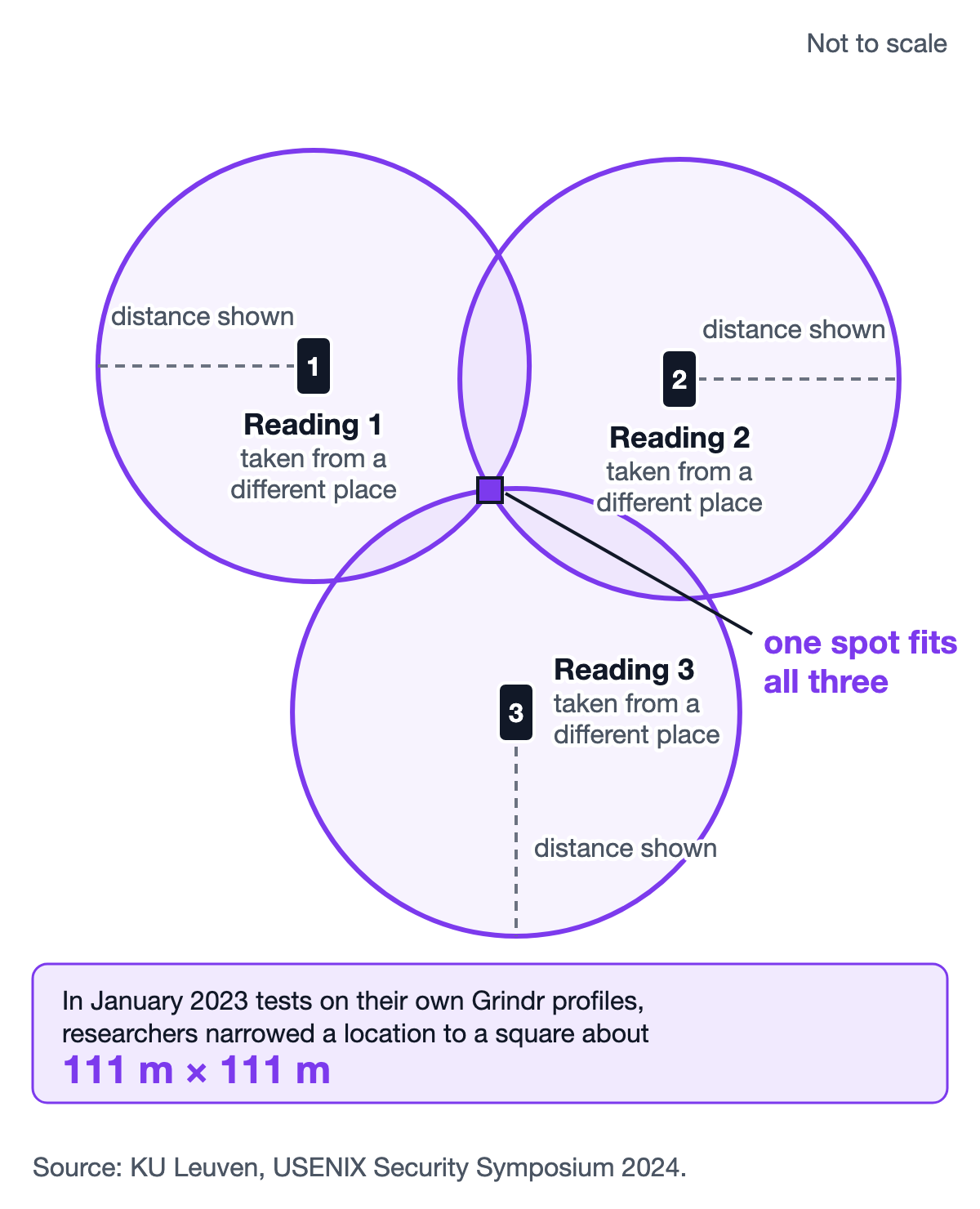
| January 2023 (published 2024) | Researchers at KU Leuven, a university in Belgium | Their own Grindr test profiles could be located to a square about 111 m by 111 m (the paper's figure, measured at the equator) |
| Today (read 12 Oct 2026) | Grindr's own help centre | Location is collected to "approximately 100 meters" |
The 2024 paper also explains why its result was a square and not an exact point. In the January 2023 tests, the app rounded each user's coordinates (the latitude and longitude that mark a spot on the map) to three decimal places before sending them to Grindr's servers. So, the researchers wrote, Grindr would "never know a user's exact location". In 2019, Pen Test Partners had suggested this kind of rounding to app makers: three decimal places, they wrote, is "roughly street/neighbourhood level". The 2023 researchers still called it "insufficient, especially in sparsely populated areas".
No source we found says when Grindr started rounding, so the 2019 and 2023 results are not a before and after.
Three distances can point to one spot
Picture three friends standing in three different places. Each one tells you how far away a certain person is, but not in which direction. On a map, each answer is a circle around that friend. Only one place sits on all three circles, and that is where the person is.
This idea is called trilateration: finding a place from distances alone. In the researchers' words, given three positions and the distance from each, the person "will be at the intersection of the three circles".
Researchers have shown this on Grindr more than once:
- 2014 and 2018. Earlier studies showed it on Grindr in both years, according to the 2024 paper.
- 2019. Pen Test Partners located and tracked users of four dating apps, Grindr among them, by getting the distance to a profile from several points. For the BBC, they made a map of app users across London. They also stressed that the risk is higher for LGBT+ people.
- January 2023. KU Leuven researchers tested 15 dating apps and found 6 that let someone pinpoint a user's exact location. Grindr's result is the square in the table above.
What happened after the tests is uneven:
- Grindr "didn't respond at all" to the 2019 researchers, they wrote. A Grindr spokesperson told the BBC that users "could hide this location data on their profiles", PinkNews reported.
- Recon, another app in the 2019 test, said it would reduce the precision of location data and use "snap to grid", and later said it had fixed the issue. With snap to grid, everyone appears at the centre of a grid square, so distances are still useful but the real spot stays hidden.
- Tinder and LOVOO blocked trilateration with grid snapping in the 2023 tests, using squares of 1 × 1 mile on Tinder and 1 × 1 km on LOVOO. Apps that measured distance from a nearby town centre or a grid point, not your exact spot, were not open to it. Snapping locations to a grid or a nearby town before working out distances is one fix the researchers suggest.
- 9 of the 12 apps whose makers answered the KU Leuven team said they had deployed fixes for the leaks the team reported, which covered more than location. The paper doesn't say which nine, so it doesn't tell us whether Grindr changed anything.
These are tests from 2019 and January 2023, and apps change. We found no source that says whether the same methods work on Grindr today.
Hiding your distance hides the number, not your place in the grid
Turning off Show My Distance removes the number from your profile. It does not take you out of the grid. Grindr's Settings page says your profile "will still be visible to other people in your Grid, sorted by your distance from them", so "other people may still be able to approximate your distance". If the profiles on either side of yours show their distances, yours sits somewhere between them.
Grindr's privacy policy (effective 6 July 2026) says more. A distance shown on your profile "could be used by some users to determine your exact location and to determine your identity". And if you hide it, Grindr "will continue to sort and display your profile based on your relative distance from other users". To Grindr's credit, the 2024 paper found its privacy policy was the only one among the apps it studied that warned users about this kind of location guessing.
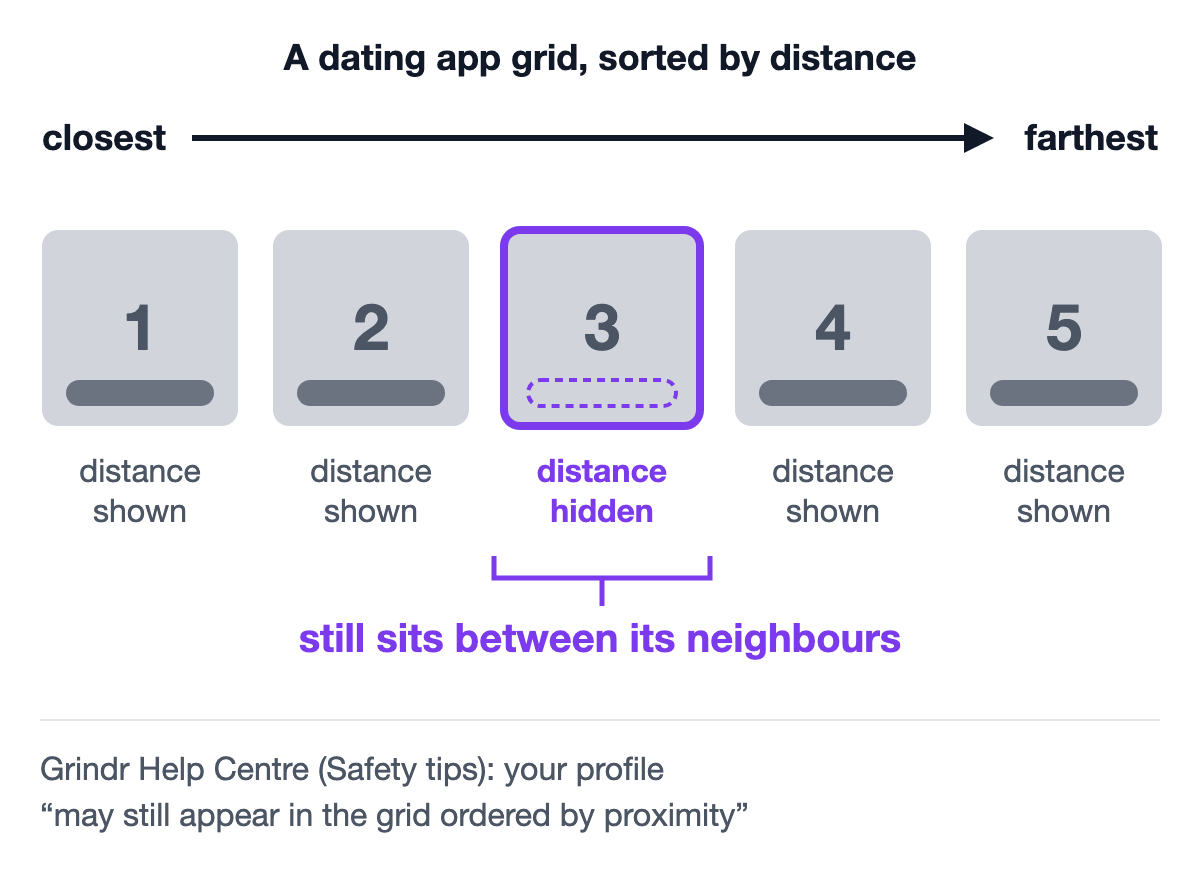
In the January 2023 test, the researchers went further than an estimate. Using their own test profiles, they showed that because the grid was sorted by distance, a hidden distance could still be worked out, and a user who had hidden it could still be located. On two other apps, Hinge and Hily, distances hidden on screen leaked through the distance filter instead. The researchers concluded that "one cannot assume that hiding distances solves trilateration vulnerability".
What each Grindr setting hides, and what it doesn't
Swipe the table sideways to see every column →
| Setting | Where to find it | What it hides | What it doesn't hide, or the catch |
|---|---|---|---|
| Show My Distance off | Grindr: Profile icon → Settings → Show Me | The distance number on your profile | You stay in other people's grids, sorted by distance, so they may still estimate it |
| Show Me in Explore Searches off | Grindr: Settings | You, from other people's searches by city or zip code | It does not hide your location from local users on the grid |
| Precise location off | Your phone's settings (steps below) | Your exact spot. On Android the app learns only an area of about 3 square kilometres | The app still knows your general area |
| Location off completely | Your phone's settings | Your location, from Grindr | Grindr's pages don't say how the app works without it |
| Grindr Incognito | Grindr: Profile icon → status bar below your name | Your profile, from the grid (more in the next section) | Needs Grindr Unlimited, its highest paid tier |
| Closing the app | — | Nothing at once | You stay visible for a while (see the next section) |
| Roam | Grindr, paid add-on | Nothing. It shows your profile in another place for 1 hour | Paid. Your profile shows a blue pin and "Roaming" (or your arrival time). Grindr doesn't list it as a way to mask your location |
| Fake GPS (a mock location app) | — | — | Grindr does not support mock locations |
From Grindr's help pages "Settings", "Safety tips", "Getting in the (safety) zone", "Location troubleshooting", "Grindr Unlimited", "Chatting with other profiles" and "Roam", and Google's Android Help. Read 12 Oct 2026.
To turn off Show My Distance:
- Tap your Profile icon, then Settings.
- Scroll down and tap Show Me.
- Tap the toggle for Show My Distance. Grey means off; Grindr's yellow means on.
To turn off precise location on Android (menu names vary by phone make):
- In your phone's settings, open App info for Grindr.
- Tap Permissions, then Location.
- Turn off Use precise location.
On iPhone: Settings → Privacy & Security → Location Services → Grindr → turn Precise Location off.
Grindr's help centre suggests these phone settings itself, if you don't want to show even your approximate distance.
Grindr offline: how to go offline, and how long you stay visible
To go offline on Grindr, close the app. The green dot on your profile can stay for up to 15 minutes after that. Then your profile shows a rough count of the minutes since you were last online. Your profile typically stays visible in other people's grids for up to 1 hour after you close the app, and occasionally for up to 2 hours.
That last point matters for distance too: for up to an hour after you leave, sometimes two, you can still sit in a grid sorted by how close you are.
A few details change the timing:
- Grindr Web: the green dot disappears as soon as you log off.
- Quick Reply on iPhone: answering a chat from a notification updates your location and online status, just like opening the app.
- Someone else's profile: a time instead of a green dot is Grindr's rough estimate of how many minutes since he was last online.
Grindr Incognito, an Unlimited feature, hides your profile from the grid while you keep using the app. You appear offline to people you tap or message, and you don't show up on anyone's Viewed Me list. To turn it on, tap your Profile icon, find the status bar below your display name, and choose Incognito. It stays on when you leave the app and come back.
How to change distance on Grindr: what you can set
If you want to set distance on Grindr, meaning a limit so you see only men within a certain radius, Grindr's Filters help page doesn't list one. Its filters cover online status, age, position, photos, tribes, body type, height, weight and more, but not distance (12 Oct 2026). A request for distance controls on Grindr's feedback board, posted in May 2022, had 5,568 votes on 12 Oct 2026.
By default, the grid shows the people closest to you, plus anyone using Grindr's Boost feature. Free users can see dozens of nearby profiles, XTRA users up to 500, and Unlimited users all of them.
What you can change:
- Kilometres or miles: Settings → Unit System → Unit, then choose Metric or Imperial (U.S.).
- Whether your distance shows: the Show My Distance switch above.
- Where you browse: Explore lets you move the map to another place, or search for one, to see the grid there.
- Where your profile appears: Roam, the paid add-on in the table above.
Small habits that keep your location yours
What you share in a chat can say more than any distance number.
- Think before you share your live location. Grindr lets you send your GPS location to anyone in a chat. Its own safety tips say "sharing your real-time location or home address can be risky", and that you shouldn't feel pressured to share just because someone else does.
- Raise your caution if you're not out. Grindr suggests "a high level of caution" if you are not out to your family or at work.
- Treat other people's location the same way. Golo's community guidelines put it plainly: "Never share someone's private information, or reveal their sexual orientation ("out" them), without their consent."
How Golo shows distance, and what we can't promise yet
Golo is our app, so weigh this part with that in mind.
On Golo, other people only ever see an approximate distance to you, in kilometres, never your exact location. Browse starts with the men who were active most recently; you can sort it by Nearby instead, or narrow it to one state.
That means other users never receive your coordinates. But trilateration uses only the distances people see, and the research above shows that sorting and distance filters can give a location away when they use exact distances. Golo sorts by distance and has a distance filter too. Our website doesn't yet say whether Golo rounds or snaps a location before it works out a distance, so we won't claim more than it says. Golo is built to reduce what can leak, and the habits above matter on any app, ours included.
Golo is free and runs on Android. An iPhone version is not available yet, so if you're on an iPhone, Grindr's settings above are the ones to use.
To see where each app is stronger, read how Golo and Grindr compare, or how Golo compares with other apps. You can also read how Golo shows only an approximate distance, or get Golo on Google Play.
Golo is not affiliated with, endorsed by, or connected to Grindr.